
Categories
 Agentic Ailune
 Profile
 Contacts
 Notes & Cloud Files
 CRM
CRM Billing
 Quote Flow
 Tasks
Tasks ClockEase & Payroll
 Phone Hub
 Booking Hub
 Fleet Hub
 HireFlow
 Cybix AI
 Connect
 Administration
 Sales & Operations
 Video Meeting
- Cybix App
- About the development company.
- About my Membership
To start managing the commercial information handled by your artificial intelligence, you must go to the main menu located on the left sidebar. Within this menu, expand the Agentic Ailune section and click on the Knowledge option.
Upon entering this screen, you will find the Products and Services section at the top. This area allows you to read your catalog live and choose which of these items Ailune is authorized to discuss, as well as define how much pricing information it may reveal during its conversations.
Right below, you will find the section to configure who may read your catalog. Here you have the ability to enable the option to share the data with the Halley assistant on your website, which allows visitors to be told what you offer and what it costs. You can also check the box to share this knowledge with your artificial intelligence employees, making it easier for your own internal team to ask the AI about available offers and prices.
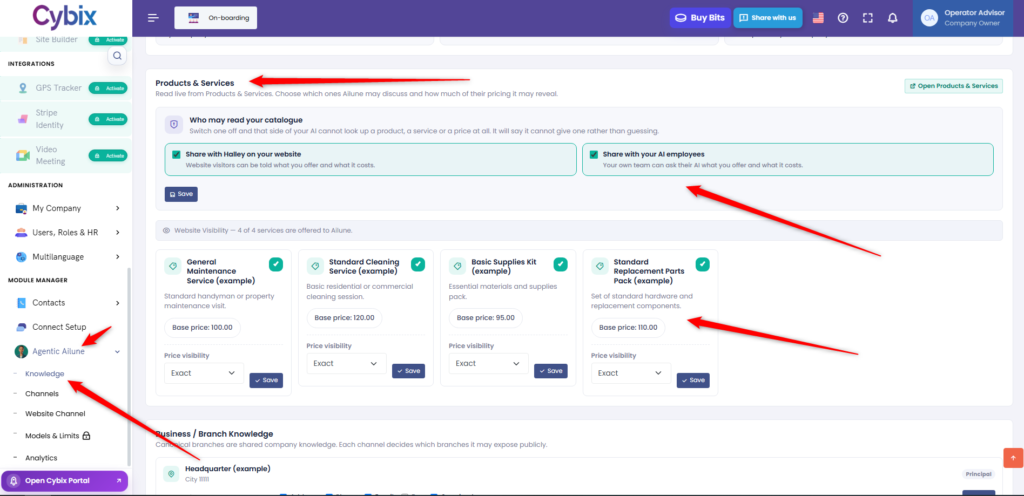
Finally, at the bottom of the screen, you will see individual cards corresponding to each product or service in your catalog, such as maintenance services, cleaning sessions, or replacement part packs. On each of these cards, the system allows you to configure the price visibility through a dropdown menu, being able to choose to show the exact cost, and then save the preferences for each item individually.