
Categories
 Profile
 Contacts
- Users
- How to add a new contact?
- How to edit a contact?
- How to view a contact’s full information?
- How to import contacts from a CSV file?
- Managers
- How do I manage contact labels?
- How do I manage business contact categories?
- How do I import or export my contacts?
- How do I manage social networks for contacts?
- How do I add dashes to format phone numbers?
- How do I manage contact types?
 Notes & Cloud Files
 CRM
CRM- Users
- How to quickly add a lead?
- Can I group my prospects?
- How to convert a client into a prospect to sell another product?
- I’m the Sales Manager and have several sales executives, how can I reassign a lead from one to another?
- How do I move a lead between different CRM steps?
- How do I register an event or activity for a prospect?
- How can I view the list of products and services?
- Managers
- How can I manage prospect stages?
- How can I manage prospect events and activities?
- How can I manage prospect statuses?
- How can I manage work order statuses?
 Billing
- Users
- How to create an invoice?
- How to print an invoice?
- How to download an invoice as a PDF?
- How to resend an invoice?
- How to pay an invoice?
- How to view the list of payments?
- How to view the list of receipts?
- How to add a receipt?
- How to import invoices from Quickbooks?
- How to Manage and Log Expenses?
- How to View and Manage the Operational Ledger?
- Managers
- How can I manage payment terms?
- How can I configure my payment gateways?
- How to Manage and Create Billing Email Templates?
 Quote Flow
 Tasks
Tasks- Users
- How to add a task?
- How to add a project?
- How to start and stop task time?
- How to add a sub-task?
- How to change a task’s status?
- How to Navigate and Switch Task List Views?
- Managers
- How can I manage projects?
- How can I manage task priorities?
- How can I manage task statuses?
- How do I manage common tasks?
- How do I manage task tags?
 ClockEase & Payroll
 Phone Hub
- Users
- How to make a call?
- How to send a text message?
- How to check voicemails?
- How to manage my voicemails?
- How do I mark a text message as unread?
- How to Manage and Configure Voicemail Greetings?
- How to Use AI Actions for Text Messages?
- How to Manage Text Message Reports?
- How to Use AI for Your Voicemails?
- How to Manage SMS Conversations?
- How to Use AI Features for Your Text Messages?
- How to Translate Incoming Text Messages?
- How to manage SMS campaigns?
- How to Use Templates in Text Messages?
- How to Schedule Text Messages for Later Delivery?
- Managers
- How can I manage the system phone numbers?
- How can I manage sms templates?
- How to Access and Filter Call Reports?
 Booking Hub
 Fleet Hub
- Users
- How to add a vehicle?
- How to register vehicle maintenance?
- How to add a checkpoint to a vehicle?
- How to set a reminder for a vehicle?
- How to report an issue with a vehicle?
- How to view full vehicle information?
- Managers
- How can I manage vehicle brands?
- How can I manage vehicle types?
- How can I manage vehicle subtypes?
- How can I manage the service types used in vehicle maintenance?
- How can I view and manage mileage by service and brand?
- How to configure GPS providers?
 HireFlow
 Cybix AI
 Connect
 Administration
- Managers
- Set Up Your Company
- Register Your Main Office and Branches
- Set Up Special Taxes
- Upload Your Products or Services
- Configure Outgoing Email (SMTP)
- Define Units of Measurement
- Define Your Referral Sources
- Define Roles for Your Team and Clients
- Create Individual Access for Each Member of Your Organization or Business
- Create Work Teams
- Activate Automatic Notifications
- Install New Languages
- How to manage employees and contractors profiles?
- How to configure the organization chart?
- How to manage and configure company departments?
- How to manage job positions?
- How to manage and organize workforce teams?
- How to manage the worker types?
- How to configure and manage compensation rate types?
- How to configure workforce rules?
- How to manage the employee statuses?
- How to configure organizational access?
- Guide to Business Permissions in Cybix: Roles, Positions, and Scopes
 Sales & Operations
- Users
- How to create a new work order?
- How to monitor and filter purchase orders?
- How to view and filter sales commissions and bonuses?
- How to add and manage referrals?
- How to copy and distribute the system referral link?
- How to view and check the services and products price list?
- Managers
- How to manage sales email templates?
- How to manage work order statuses?
 Video Meeting
- Cybix App
- Users
- Navigation & Menus Guide
- How to Make a Call Using the App?
- How to Send Text Messages Using the App?
- How to Manage Your Voicemails Using the App?
- How to set up your voicemail greeting in the app?
- How to create an invoice using the app?
- How to access billing reports using the app?
- How to use different views in tasks module in the app?
- How to create a task using the app?
- How to log time on a task in the app
- How to Create a New Booking Event in the app?
- How to Use and Share Your Public Booking Links in the app?
- How to Create Applicant Forms in the app?
- How to Create a New Contact Using the App?
- How to Create Notes Using the App?
- How to Upload Documents to Cloud Files using the app?
- How to Send Messages in Connect using the app?
- How to Use Cybix AI Within the App?
- How to Create a Vehicle using the app?
- How to register a vehicle maintenance using the app?
- How to report a vehicle issue using the app?
- How to create a reminder for a vehicle using the app?
- How to create a checkpoint for a vehicle using the app?
- How to view the attendance calendar in Clockease using the app?
- How to monitor team status using the punchboard in the app?
- How to request time off in Clockease using the app?
- How to create a prospect in CRM using the app?
- How to move stages and change statuses in CRM using the app?
- About the development company.
- About my Membership
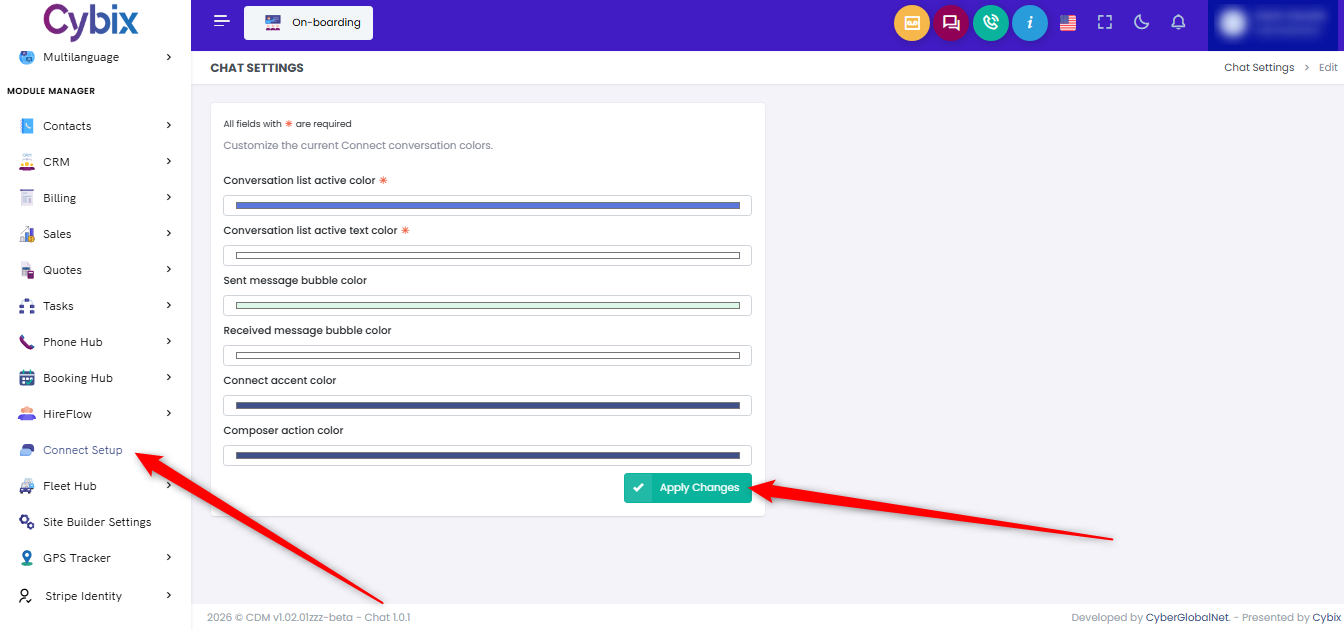
How can I customize the chat colors?
To customize the chat appearance, navigate to the “Module Manager“ section from the left sidebar and select “Connect Setup“. This will open the chat color configuration page, where you can choose the colors that best match your preferences or brand. Once you have selected your desired colors, click “Apply Changes“ to save and apply the updates.
357